










Quantum Queen EA MT5 2026 Review, Setting, Real Results & Risk Analysis




If you have spent any time searching for Quantum Queen MT5 EA, you already know what the internet looks like. Big headlines, flashy screenshots and claims that feel too good to be true. Steady growth, tiny drawdown, hands-free profits. The whole package.
But you are not here for another sales pitch. You want to know what this robot really does, where it shines and where it can hurt you. So let us walk through everything step by step, without the marketing layer.
What Is Quantum Queen MT5 EA
Quantum Queen is an automated trading system built to run on MetaTrader 5. It trades one instrument and one instrument only. Gold. The symbol you will see on your chart is XAUUSD.
This matters more than most people realize. Gold is not like currency pairs. It moves differently. Spreads widen fast when volatility picks up. Trends can extend for days or weeks without meaningful pullbacks. And the reactions around news events can be violent.
A robot built specifically for gold understands these quirks. Or at least it should. Quantum Queen is part of a group often labeled the Quantum family. There are other systems in this family with similar internal logic but different risk appetites. Think of them as variations on the same theme, not clones.
How The Trading Logic Actually Functions
On the surface, it seems ordinary. The EA waits for conditions to align and then enters a trade. Standard stuff. Nothing groundbreaking here.
The difference shows up when that first trade goes negative.
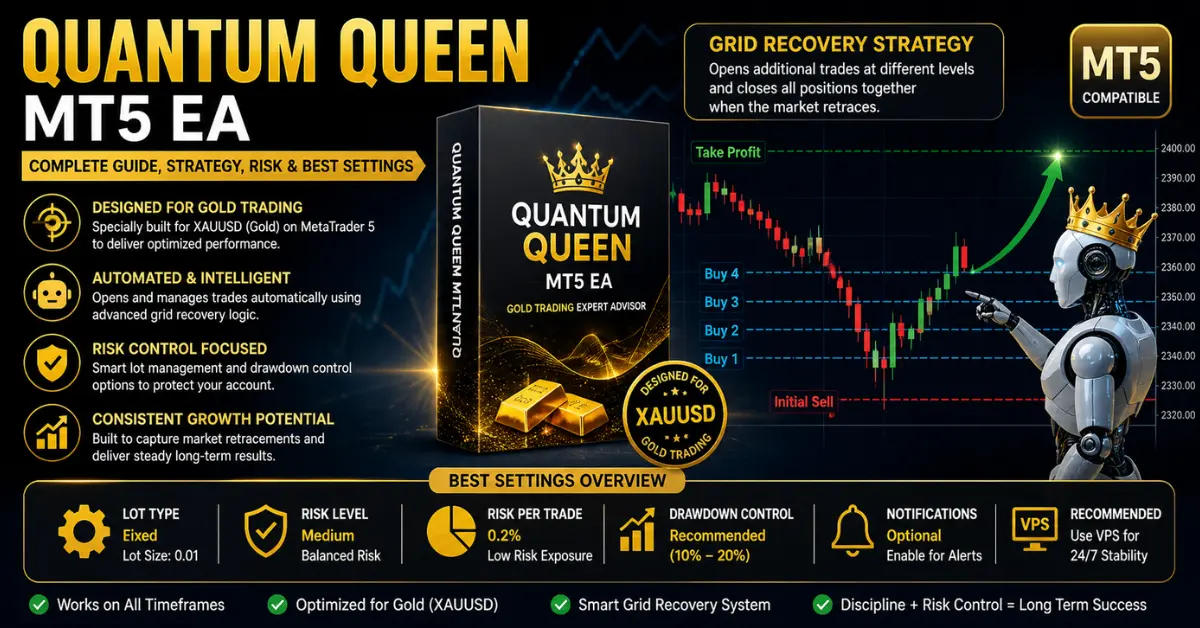
Instead of taking the loss and moving on, the EA opens another trade at a different price level. If the market keeps moving against it, it opens another. And another. The goal is to average down the entry price so that when the market retraces, even slightly, all positions can close together at a net profit.
Traders call this approach by different names:
Grid recovery
Zone recovery
Averaging down
Basket trading
Why The Strategy Looks Good In Certain Markets
When gold is choppy and moving sideways, this system does exactly what it was programmed to do.
Here is why those conditions favor it:
Prices bounce up and down frequently
Small retracements happen often
Each bounce gives the EA a chance to close the entire basket in profit
Win rates stay high because trades do not stay open for long
This is when the account balance climbs in a way that looks almost too smooth. You glance at the chart and feel confident. Everything seems under control.
Where The Real Danger Sits
The problem has nothing to do with how the EA enters trades. It is all about what happens after.
When gold breaks into a strong trend and refuses to pull back meaningfully, the system continues doing its job. It opens more positions. Then another layer. Then another.
This sets off a chain reaction where three things happen simultaneously:
Drawdown expands rapidly
Margin usage climbs higher and higher
Free margin shrinks to uncomfortable levels
This exact moment is where accounts either survive or get wiped out. Not on the calm days. On the trend days when gold remembers it can move in one direction for a long time.
Understanding Drawdown
Drawdown is simply how much money your account is currently down based on open trades.
With Quantum Queen, drawdown can remain tiny for extended periods. A few percent here and there. This creates a strong feeling of safety. You start trusting the system more than you probably should.
But the market does not stay calm forever. When a trend arrives, drawdown can jump from low single digits to 20 or even 30 percent surprisingly fast. This does not mean the EA has failed or broken. It means it is doing what it was built to do. Whether your account can handle that journey is a different question entirely.
Margin Usage And Why It Deserves Your Full Attention
Margin is the collateral your broker holds to keep trades open. Most traders ignore it until they get a margin call. By then, it is usually too late.
With grid-based systems, margin is everything. Here is what happens during a trend:
Trade 1 opens – margin usage is minimal
Trade 2 opens – still manageable
Trade 3 and 4 open – margin usage starts climbing noticeably
Trade 5, 6, 7 open – free margin is now uncomfortably low
If the trend keeps running and the EA keeps adding positions, your broker will eventually step in and start closing trades automatically. This is called a stop-out. When that happens, floating losses become permanent losses. There is no recovery from that point.
Realistic Performance Expectations
Forget the screenshots that show perfect 45-degree equity curves. Real trading does not look like that.
| Market Condition | Typical Behavior | What You Will See |
|---|---|---|
| Ranging / Choppy | EA performs well | Steady small gains, high win rate |
| Mild Trend with Pullbacks | EA manages okay | Slower growth, occasional drawdown spikes |
| Strong Trend, No Pullbacks | EA struggles | Extended drawdown, margin pressure builds |
| News-Driven Volatility | Unpredictable | Spreads widen, entries may be blocked or poor |
Performance comes in cycles. There are periods of smooth growth followed by periods of stress. Accepting this upfront prevents panic when the account inevitably hits a rough patch.
Versions And Updates Over Time
Quantum Queen has gone through several iterations. Common version numbers include:
v2.1
v2.6
v2.91
v3.52 (latest as of this writing)
Each new version typically brings refinements:
Slightly adjusted entry logic
Better handling of specific market conditions
Execution improvements
Bug fixes from previous releases
But here is the key thing to understand. No version removes the core grid recovery architecture. That foundation stays across every single release. The strategy is being polished, not replaced.
Settings Explained Without The Jargon
Most EA setting guides read like technical manuals written by someone who forgot what it feels like to be a beginner. Let us break everything down into simple, actionable explanations.
General Information
| Setting | Default Value | What It Means |
|---|---|---|
| EA Name | Quantum Queen MT5 v3.52 | Current version identifier |
| Designed For | XAUUSD (Gold) | Optimized specifically for gold trading |
| Timeframe | Any | Can run on any timeframe depending on your setup |
General Settings
| Setting | Default | What You Should Know |
|---|---|---|
| Start EA Paused | OFF | EA begins trading immediately after attachment. Always check settings before going live |
| Gold Symbol | XAUUSD | Do not change this. The EA is not built for other pairs |
| Lot Calculation Method | Fixed | Uses a predefined lot size for every trade. Keeps things consistent and predictable |
| Auto Lots Risk Level | Medium | Balanced approach. Suitable for most traders without being too aggressive |
Lot and Balance Management
| Setting | Default Value | Why It Matters |
|---|---|---|
| Fixed Lot | 0.01 | Looks tiny. Stays safe if used alone. But multiple positions can stack this up fast |
| Fixed per Balance | 1000 | Adjusts position size relative to account balance for controlled scaling |
| Percent of Balance (PoB) | 0.2% | Very low initial exposure. Note: this only applies to the FIRST trade, not the full basket |
| Minimum Volume per Balance | 1000 | Ensures trades only open when account meets minimum balance requirements |
Drawdown Control – The Setting That Saves Accounts
| Setting | Default | Recommendation |
|---|---|---|
| DD Control Mode | OFF | Turn this ON. Without it, nothing stops the EA during a spiraling loss |
| DD Value | 0 | Set a clear limit. Many traders use 10-20%. This is your emergency brake |
This setting alone is often the difference between surviving a bad trend and getting wiped out. Leaving it off means you trust the market to always come back. Markets do not always cooperate.
Notification Settings
| Setting | Default | What It Does |
|---|---|---|
| MQID Push Notification | OFF | Can be enabled to receive real-time alerts on your phone |
| Magic Number | 1234 | Unique identifier so the EA knows which trades are its own |
Visual and Display Settings
| Setting | Default | Purpose |
|---|---|---|
| Show Panel | OFF | Keeps chart clean. Can be turned on if you prefer visual feedback |
| Panel Font | Trebuchet MS, Size 8 | Simple and readable when panel is active |
| Panel Comment | Quantum Queen MT5 | Helps identify the EA among multiple running systems |
| Line Style | Solid, Width 2 | Makes trade levels clearly visible on the chart |
| Take Profit Line Color | Lime | Easy to spot |
| Break Even Line Color | White | Clear visual indicator |
| Grid Line Color | Yellow | Shows grid levels at a glance |
| Max Spread (Points) | 30 | Blocks trades when spreads are too wide. Helps avoid bad entries during volatile moments |
Lot Size – Small Number, Big Implications
A 0.01 lot looks completely harmless. And by itself, it is.
But remember how this EA works. It does not stop at one trade. During a trend, you could have:
5 positions open
10 positions open
15 positions open
Suddenly that tiny 0.01 lot size across 10 trades starts looking a lot more serious. The risk multiplies quietly in the background while most people focus only on the first trade.
If you increase the lot size to 0.02 or 0.05 thinking it will speed up growth, the risk scales even faster during drawdown phases. A safer path is to keep the lot small and let compounding do the work over months, not days.
Balance-Based Scaling In Practice
The EA includes logic that adjusts position sizing based on your account balance:
Account grows → lot size increases slightly
Account shrinks → lot size decreases slightly
This sounds intelligent, and conceptually it is. Keeping risk proportional to account size is solid risk management.
The problem arises when your base lot size is already too aggressive. Scaling then amplifies risk during exactly the wrong moments. If you start conservative, scaling works for you. If you start aggressive, scaling works against you.
Why The Risk Percentage Can Be Misleading
Seeing 0.2% risk on the settings screen feels reassuring. That is pocket change, right?
Not exactly. That percentage applies to your first trade only.
When multiple trades are open simultaneously, your total exposure can be much higher. Five trades that each started at 0.2% can collectively represent a far larger chunk of your account than the settings suggest.
This is not a bug. It is how grid systems function. But believing your total risk is 0.2% when it could be 2% or 5% during a basket event is a dangerous misunderstanding.
Spread Filter And Why Your Broker Determines Everything
Gold spreads are not constant. During quiet sessions, they might be tight and manageable. During news:
Spreads can jump from 5 points to 30+ points in seconds
Entries that looked good become terrible
Slippage eats into both entries and exits
The Max Spread filter caps entries at 30 points. This is genuinely helpful. It stops the EA from opening trades when conditions are unfavorable.
But the effectiveness depends entirely on your broker. If your broker has consistently wide spreads, the EA may enter fewer trades or enter at borderline moments. Broker quality is not a minor detail. It is a make-or-break factor.
Step-By-Step Installation Without The Confusion
Setting up is simple but small mistakes cause problems later. Follow these steps in order:
Install MetaTrader 5 on your computer or VPS if you have not already
Locate the Experts folder inside your MT5 directory
Place the EA file into that folder
Restart the platform completely so it registers the EA
Open an XAUUSD chart – this is the gold symbol
Attach the EA to the chart by dragging it from the Navigator panel
Enable automated trading in your platform settings – look for the button that says “Algo Trading”
Double-check all settings before letting it run
Important note. Test everything on a demo account first. Not for a day. Not for a few hours. Run it for weeks. Watch how it behaves in different market conditions. Only then consider going live.
Choosing A Broker That Works With This EA
Not all brokers are equal. A great EA on a bad broker produces bad results. Period.
Here is what to prioritize:
Low and stable spreads – Gold spreads should be tight during normal market hours
Fast execution speed – Delays turn decent entries into bad fills
Minimal slippage – Slippage adds up over hundreds of trades
Reliable during news – Some brokers widen spreads drastically during volatility
If execution is slow or spreads are unpredictable, your real-world results will never match what the EA is theoretically capable of. The logic might be perfect. Execution failures will still cost you money.
Why A VPS Is Not Optional For Serious Users
A VPS (Virtual Private Server) keeps your trading platform running 24 hours a day without interruptions.
Running the EA on your home computer introduces risks:
Power cuts
Internet drops
Windows updates forcing restarts
Hardware failures
Any interruption can cause missed trades or delayed execution. Over time, these small gaps add up to significant differences in performance.
A VPS gives you a stable, always-on environment. For automated trading, consistency of execution is just as important as the strategy itself.
Matching Settings To Account Size
Different accounts need different approaches. There is no universal best setting.
| Account Size | Focus | Recommended Approach |
|---|---|---|
| Small (under $1000) | Survival | Minimal lot size, drawdown control ON, no aggressive scaling |
| Medium (1000−5000) | Controlled growth | Modest lot size, allow gentle scaling, keep drawdown limits active |
| Large ($5000+) | Efficiency | Slightly optimized settings, but do not increase risk just because the account can absorb more |
Common Mistakes That Keep Repeating
Most people who struggle with Quantum Queen run into the same few problems:
Using a lot size too large for their account – The number one mistake. Impatience kills accounts fast
Leaving drawdown control disabled – No safety net means no protection when trends run hard
Skipping demo testing entirely – Going live without understanding how the EA behaves in different conditions
Choosing a broker based only on low costs – Cheap brokers often have poor execution and wide spreads
Increasing risk after a few good weeks – Overconfidence after a winning streak leads to oversized positions
Expecting profits too quickly – This EA is designed for gradual growth, not fast returns
Avoid these six things and your experience will already be better than most people who try this system.
How Real Long-Term Performance Actually Looks
Most promotional material shows carefully selected time windows. A month of smooth gains. A quarter of consistent growth.
Real performance over a year or more includes:
Periods of calm growth where small wins accumulate steadily
Periods of drawdown where the account sits in the red for weeks
Recovery phases where the EA closes baskets and the balance jumps back up
Flat stretches where nothing much happens for a while
The balance on your account screen only shows closed trades. It can look clean and steady even while equity is under significant pressure. Equity shows the full picture, including open positions.
If you only look at balance, you are seeing half the story. Equity tells you the truth.
Recovery Phases And How They Unfold
When the market finally retraces, the EA attempts to close all open positions together in profit.
If the retracement is deep enough, recovery happens quickly
If the retracement is shallow, positions stay open longer
If the retracement never comes in a meaningful way, the account remains under pressure
Patience is essential with this EA. But patience without risk controls is just gambling with extra steps. You need both.
When Recovery Becomes Impossible
There are market conditions where no amount of waiting helps.
Picture gold in a strong fundamental trend driven by macro news. Rate decisions. Geopolitical shocks. Inflation surprises. The market moves one way for weeks with barely any pullbacks.
In that scenario:
Positions keep stacking up
Margin usage climbs relentlessly
Free margin drops toward zero
The broker eventually issues a margin call
Trades are closed at a loss
The recovery never happens
This is not a daily occurrence. But it is absolutely possible, and anyone using this EA needs to accept that this scenario exists.
Comparison With Other Gold Trading EAs
The market has several gold-focused trading robots. Here is how they compare honestly:
| EA Name | Strategy Type | Risk Level | Drawdown Behavior | Best Suited For |
|---|---|---|---|---|
| Quantum Queen MT5 | Grid + Smart Entry | Medium | Gradual but expandable | Patient long-term traders |
| Gold Reaper MT5 | Aggressive Grid | High | Fast spikes during trends | High-risk tolerance traders |
| Waka Waka EA | Scalping | Medium | Controlled and tight | Short-term consistent trading |
| XAUBOT AI | Adaptive / AI | Medium to High | Unpredictable | Experimental users |
| Quantum King EA | Aggressive Grid | High | Rapid expansion under pressure | Aggressive growth seekers |
Quantum Queen sits in the middle of the risk spectrum. It is not the most aggressive and not the most conservative. That middle ground can work well for traders who understand what they are signing up for.
Is Quantum Queen Suitable For Long-Term Use
The answer depends entirely on how you use it.
With conservative settings, proper drawdown controls, and realistic expectations, it can serve as a long-term tool for gradual account growth.
With oversized lots, disabled protection, and aggressive scaling, long-term use becomes difficult. The math eventually catches up during a bad trend.
The EA itself is not the only factor. Your management determines the outcome.
What Kind Of Trader Should Use This EA
This system is a decent fit if you:
Prefer gradual growth over quick returns
Can handle seeing drawdown without interfering
Are comfortable following a structured setup
Understand that drawdown periods are normal and expected
It is not a good fit if you:
Want fast, aggressive returns
Panic when you see floating losses
Trade under strict prop firm rules with tight drawdown limits
Tend to change settings frequently out of impatience
The Honest Truth About Safety
No grid-based or recovery-style EA is completely safe. That is not pessimism. That is reality.
Any system that adds to losing positions carries the risk of compounding losses during strong, one-directional trends. The marketing might suggest otherwise, but the mechanics do not change.
Safety with Quantum Queen comes from your choices:
| Safety Factor | Why It Matters |
|---|---|
| Small base lot size | Keeps total exposure manageable |
| Drawdown control enabled | Provides an emergency stop |
| Controlled scaling | Prevents the EA from growing positions too fast |
| Reliable broker | Ensures entries and exits match the intended logic |
| Stable VPS environment | Maintains consistent execution |
| Realistic expectations | Prevents emotional decisions during drawdown |
If these factors are in place, the system becomes far more predictable.
Final Practical Advice
Run a demo first. Not for a few hours. Not for a day. Weeks. Watch how the EA behaves during both calm and volatile markets. Get familiar with the drawdown cycle before real money enters the picture.
When you go live, start with the absolute minimum lot size. Let the account grow naturally. Do not rush.
Keep your expectations grounded. This is a tool for gradual growth with managed exposure. It will not double your account in a month. Treat it accordingly and your experience will be much better.
How To Get Quantum Queen MT5 EA Without Paying Full Price
If purchasing the EA directly is not your preferred route, there is an alternative method to access it.
Instead of buying outright, you can unlock it through a membership or by opening a trading account with a partner broker.
Steps to access it this way:
Open a trading account using the recommended broker link
Complete registration and account verification
Activate your membership or eligible plan
Send a request for access
Download Quantum Queen MT5 EA once approved
This route often provides more than just one EA. Many programs bundle multiple tools, ongoing updates, and support together. So you are getting a package, not just a single product.
Conclusion
Quantum Queen MT5 EA is a dedicated gold trading robot built around a grid recovery strategy. It performs well in ranging and choppy markets where retracements are frequent. During strong trends with minimal pullbacks, it enters drawdown and tests both your patience and your margin.
The settings are not complicated, but they require genuine understanding. The most critical setting is drawdown control, which comes disabled by default. Enabling it with a reasonable limit can dramatically change your long-term outcome.
The spread filter helps avoid bad entries. The visual tools keep things readable. The balance-based scaling adjusts positions as your account grows. All useful features. None of them replace proper risk management.
This EA is best suited for patient traders who want steady growth and are comfortable with temporary drawdown as part of the process. It is not a shortcut to wealth. It is a tool that works when used correctly.
Frequently Asked Questions
Is Quantum Queen MT5 EA safe to use?
It can be relatively safe when configured properly. The default setup has drawdown control disabled, so you must enable risk limits and use conservative lot sizes to protect your account during difficult market conditions.
Can Quantum Queen EA blow an account?
Yes. Any grid-based system can destroy an account if risk is not managed. Large lot sizes, disabled drawdown control, and poor broker conditions all increase the probability significantly.
What are the best settings for this EA?
There is no single best setting for everyone. Generally, start with the smallest fixed lot possible, turn drawdown control ON, set an equity protection limit around 10-20%, and match everything to your specific account size and risk tolerance.
Does it work on all timeframes?
Technically yes. The EA can run on any timeframe. However, performance depends much more on overall market conditions and broker quality than on which specific timeframe is selected.
Does Quantum Queen use martingale?
It is not a pure martingale system but uses a grid recovery approach. It opens additional trades when the market moves against the initial position. The risk characteristics are similar.
What is the minimum deposit required?
Most experienced users recommend starting with at least 500to1000. This provides enough margin headroom for the EA to manage multiple positions without immediately running into trouble. Lower amounts leave very little room for error.